The AI assistant, in full
AI inventory software that reads your own stock
Most inventory software makes you learn where the answer lives — which screen, which filter, which column to sort. BasicInventory adds an assistant you can just ask, in plain language, and it answers from your own live stock. It reads; it never changes anything; and it stays switched off until you turn it on.
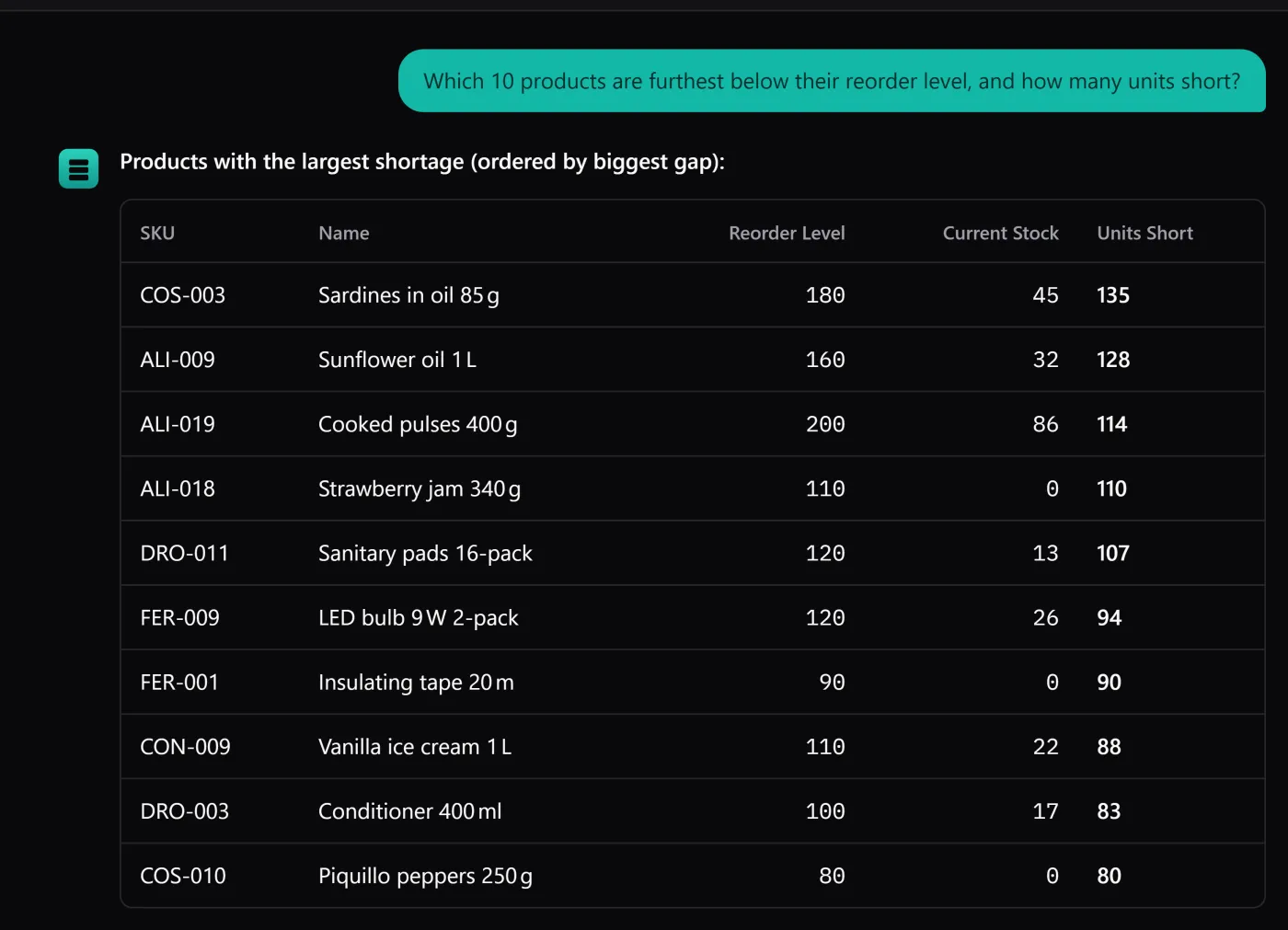
The AI assistant is a reading layer over the same database the rest of the application uses. You type a question the way you would ask a colleague, it looks at exactly the inventory rows needed to answer it, and it writes back a sentence or a small table. There is no separate data set, no sync, and no “AI copy” of your warehouse drifting out of date — it reads the same live numbers the dashboard and the movement history show.
It is also the least important reason to buy the app, which is why it ships switched off. BasicInventory is a proper stock system first — locations, lots and expiry dates, an auditable movement history, backups you own — and the assistant is simply the fastest way to interrogate all of that without learning the interface. This page is the honest, complete account of what it is and, just as importantly, what it is not.
The kind of questions you can ask
Because it reads structured data rather than guessing, the assistant is good at the questions a small warehouse actually asks all day: what is low, what is near its date, where something sits, what moved.
Reordering
- Which items are below their minimum stock?
- What do I need to reorder, and by how much?
- How many units of product X do I have in total?
Expiry & FEFO
- What expires this month, grouped by location?
- Which lot should I pick first to avoid a write-off?
- Is anything already past its expiry date?
Locations
- What is sitting in aisle B right now?
- Where is the stock of product X, by aisle and column?
- Which locations are empty?
Movements
- What left aisle B last week?
- What entries were recorded yesterday?
- Which adjustments happened this month, and why?
How it works: it reads, then it answers
When you ask, the assistant turns your question into a read of your inventory — a total, a filter, a lookup — runs it against the live database, and phrases the result back to you. The screens it draws on are the same ones you could open by hand: stock, movements, locations, lots. It is a shortcut to the answer, not a second source of truth.
The interface says so before your first message, and repeats under the input box that AI can get things wrong and that an answer is worth a glance before you trust it. It is good at retrieval — totals, what is low, what is near its date, where something is — and it is honest about the rest: it is not a forecasting engine and it will not reorder for you. It answers; you decide.
Bring your own key — it costs cents on your own account
The assistant is unconfigured out of the box. To switch it on you add a key from a provider you already have a relationship with. There is no subscription for the assistant and no markup: BasicInventory neither charges for nor resells AI usage. A question goes to the provider whose key you entered, billed to your account, under your agreement with them.
In practice a question costs a fraction of a cent to a few cents, depending on the provider and the size of your data — you pay the model maker directly, not us, and we take no cut. That keeps the app honest with its one-time price: we are not renting you an AI feature every month; we gave you a door to a service you control, and you pay only for what you ask.
- OpenAI GPT models on your own OpenAI key.
- Anthropic Claude models on your own Anthropic key.
- Google Gemini Gemini models on your own Google key.
- OpenRouter One key, many models, through OpenRouter.
Private by design, and encrypted on disk
The key you enter is stored encrypted with AES-256-GCM, and the encryption key lives outside the database. That matters the day you hand a backup to support or copy it to a new machine: the file carries your inventory, your settings and your licence, but not a usable copy of your AI credential.
Nothing is sent anywhere until you actually ask a question — and even then, only the question, the conversation so far, and the inventory rows needed to answer it go to the provider you chose, and nowhere else. There is no account, no telemetry and no middleman. If that is more than you want to send anywhere, the answer is simple: do not switch it on, and nothing leaves your computer. Everything else in the application works offline.
The honest limits
Cheaper to read now than to discover after you have paid.
- 01
Read-only. It can query your stock; it cannot create a product, edit a quantity, move a pallet, allocate stock or delete a line. A misunderstood question cannot cost you inventory, because there is no path from the assistant to a write.
- 02
Not a forecast. It reports what is true now — what is low, what is near its date, what moved. It does not predict demand, suggest order quantities or plan for you.
- 03
Needs a connection. The assistant is the one online-optional part of an otherwise fully offline app. Without internet — or without a key — it simply is not there, and everything else keeps working.
- 04
Off by default. It does nothing, sends nothing and costs nothing until you deliberately add a provider key.
- 05
Not multi-user. Like the rest of BasicInventory, it runs on one computer for one person at a time.
Go deeper
The pieces behind this page — how the assistant fits the product, the questions worth asking, and the bring-your-own-key model in detail.
- Inventory software with an AI assistant that reads your own stock →
- Questions you can ask an AI about your inventory →
- Use your own OpenAI, Anthropic, Gemini or OpenRouter key for inventory →
- AI warehouse layout: see your warehouse in 3D by describing it in words →
- The AI assistant as a product feature →
Quick answers
- Which AI providers can I use?
- Four, and you use your own key for whichever you choose: OpenAI, Anthropic (Claude), Google Gemini or OpenRouter. There is no BasicInventory account and no markup — the usage is billed to you by that provider.
- How much does the AI cost?
- Whatever your provider charges — typically a fraction of a cent to a few cents per question, depending on the provider and how much data the answer needs. It is billed to your own account; BasicInventory takes no cut and adds no subscription.
- Can the AI change my stock?
- No. It is read-only by design: it queries your inventory to answer, but it cannot create, edit, move, allocate or delete anything. A misunderstood question cannot cost you stock.
- Does the assistant work offline?
- No — it is the one part of the app that needs a connection, and it is off until you add a provider key. Every other screen works fully offline. If you never configure it, the assistant simply is not there.
See it answer, on a real warehouse
The demo runs the whole application, assistant included, in your browser on a seeded warehouse — no key, no install, no account. Ask it something and see whether the answer is the one you would have gone looking for.