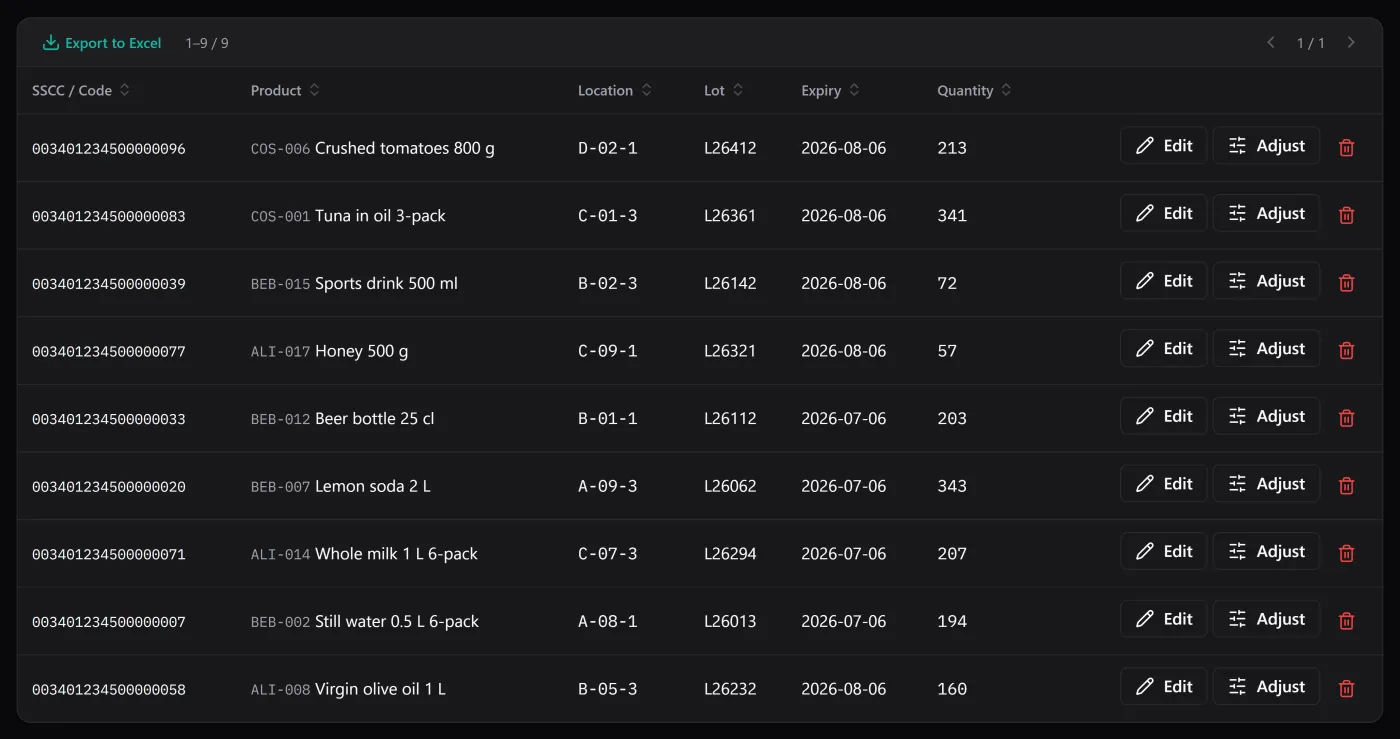
If any of your stock has a date on it, sooner or later the wrong box goes out. Lots and expiry dates are how you stop that, and FEFO — first expired, first out — is the rule that turns a pile of dates into a shipping order. This guide covers what the terms mean, why FEFO beats FIFO for dated goods, and how to track it without drowning every product in columns it doesn’t need.
Lot, batch, and why you’d bother
A lot (or batch) is a group of units produced or received together, sharing an identity — a code, and usually a date. It exists so that if something goes wrong with one unit, you can find every other unit like it. That is the whole point of traceability: when a supplier flags batch L26294, you need to know how much you have, where it is, and where it went.
Without lots, “we have 400 units of this” is a single number. With lots, it is “120 from March, 280 from June”, and only one of those numbers matters when a date is looming.
FEFO vs FIFO, in one line each
- FIFO — first in, first out — ships the oldest arrival first. Fine for screws and paint.
- FEFO — first expired, first out — ships the earliest expiry first, which is not always the oldest arrival.
For dated goods FEFO is the one that saves you money, because a batch received later can expire sooner (short-dated deliveries happen). Sorting by arrival date would leave the urgent batch sitting behind a fresher one. Sorting by expiry puts the pallet that has to move on the screen first.
Track dates only where they earn their place
The mistake most spreadsheets make is treating lot and expiry as columns that exist for everything. A tin of paint does not need a lot number; a pallet of yoghurt does. Force both onto every row and people stop filling them in, and a half-filled date column is worse than none.
BasicInventory puts the switch on the product. Each item carries two flags — lot required and expiry required — and stock of a product with those flags on cannot be registered without the data. Products that don’t need them stay simple. That is what makes the field trustworthy on the day you filter by it: it is either there for everything that needs it, or the app wouldn’t have let the stock in.
The date has to reach the person picking
A date is only useful if it arrives in front of whoever pulls the order. Storing it and never surfacing it is how batches get written off. So the dashboard counts what expires within the next thirty days, and the stock list has an “expiring soon” filter that narrows to exactly those lines — each with its lot and its location.
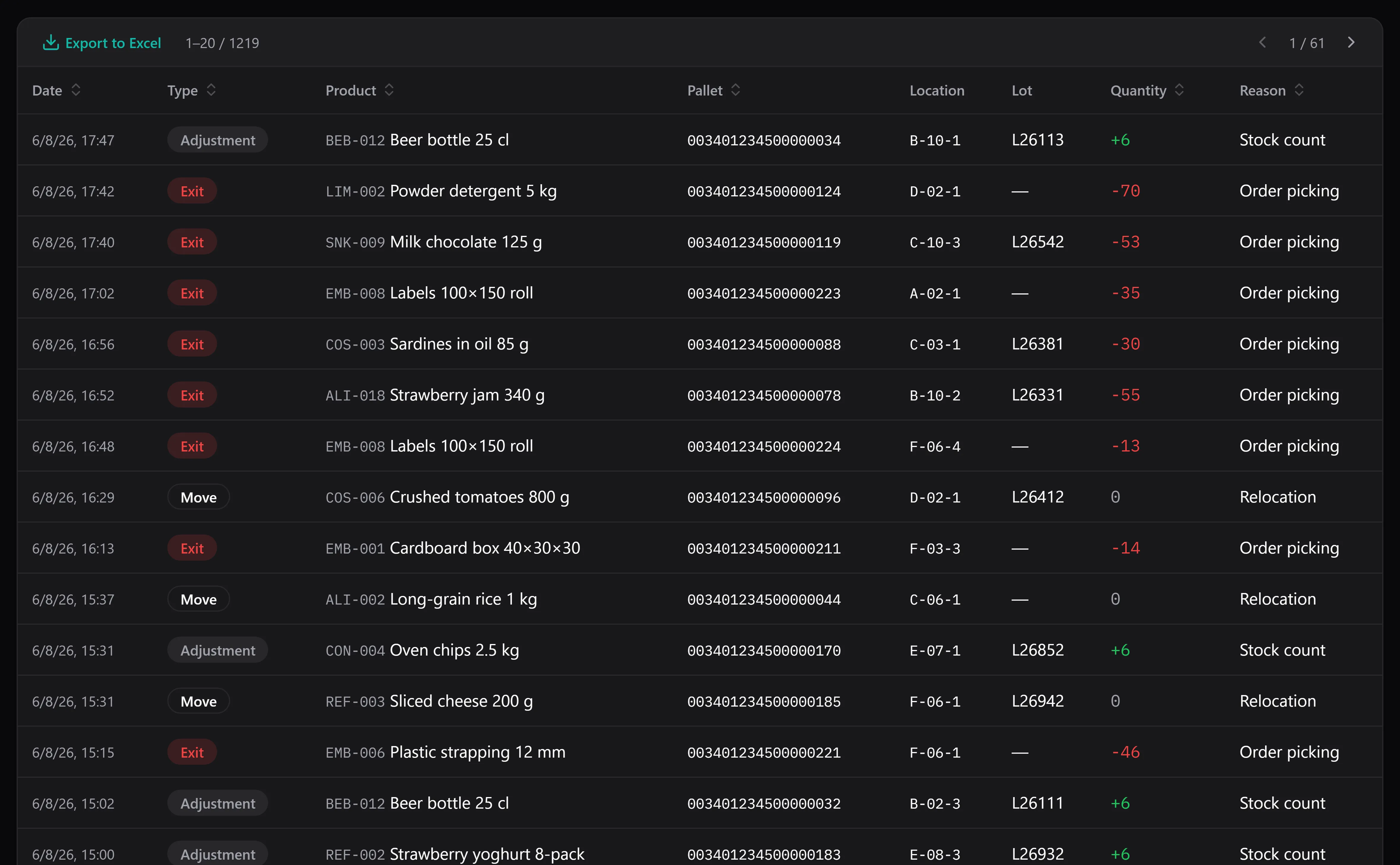
Every movement keeps a snapshot of the lot and location it touched, so traceability survives the pallet.
That turns the weekly question — “what has to go out this week, and where is it?” — into one click instead of a sort, a squint and a walk. It is the difference the food and drink distribution use case is built around, but it applies to anyone holding cosmetics, chemicals or anything with a shelf life.
Or just ask which lot to pick first
FEFO is a rule you can also ask about in plain language. With the optional AI assistant switched on, you can type “which lot should I pick first?”, “which pallet expires soonest in aisle B?” or “what expires this month, by location?” and it reads your stock and tells you the earliest-expiry lines — so you don’t scan the list yourself. It only reads and answers: it points you at the lot to take first, it never picks or moves anything for you. It’s off by default, runs on your own provider key at cents per question, and is the one part of the app that needs a connection — so if you’d rather not use it, the expiring-soon filter above does the same job entirely offline.
Traceability that survives the pallet
Here is the subtle part. Stock moves, gets consumed, gets adjusted. If the lot only lived on the current stock line, the history would go blank the moment that stock left. So each movement stores a snapshot of the lot and location it touched at the time. Six months later, “which lot went out on the 3rd?” still has an answer, because the movement remembers even though the pallet is long gone.
That is what makes a recall survivable rather than a panic. You can read backwards from a batch to every exit it appeared in.
Where it stops — be honest with yourself
BasicInventory is stock control, not a sales system. It holds no prices, no invoices and no customer records. So it can tell you that lot L26294 left the building on a given date, but which customer received it lives in your invoicing, not here. For a lot of small distributors that pairing — stock here, customers in the accounts package — is enough. If you need lot-to-customer in one system, you need an ERP, and you should know that before you buy, not after.
It is also single-user and Windows-only. One person’s machine, one database file. If that fits how you work, the honesty is a feature.
Try it before you trust it
The fastest way to see FEFO in action is the demo: a seeded warehouse, in your browser, with the expiring-soon filter already full of real-looking dates. Filter it, sort it, and check the pallet it puts first is the one you’d have chosen.
If the dated stock you keep is a pharmacy’s, expiry date control in a pharmacy puts this same rule into the back-room routine: what to check weekly, what monthly, and what to do with what you pull.
If the vocabulary here was new, the inventory glossary defines lot, FEFO, FIFO and the rest in one place. And when you’re weighing dated stock against minimum quantities, reorder points and minimum stock is the companion piece. The price is a single payment, no subscription — which for a tool you’ll open every morning is the point.